In this section we will be looking at how we can manage our Enrolment records and its components.
You will be able to see all the enrolment record in a list view on this page.
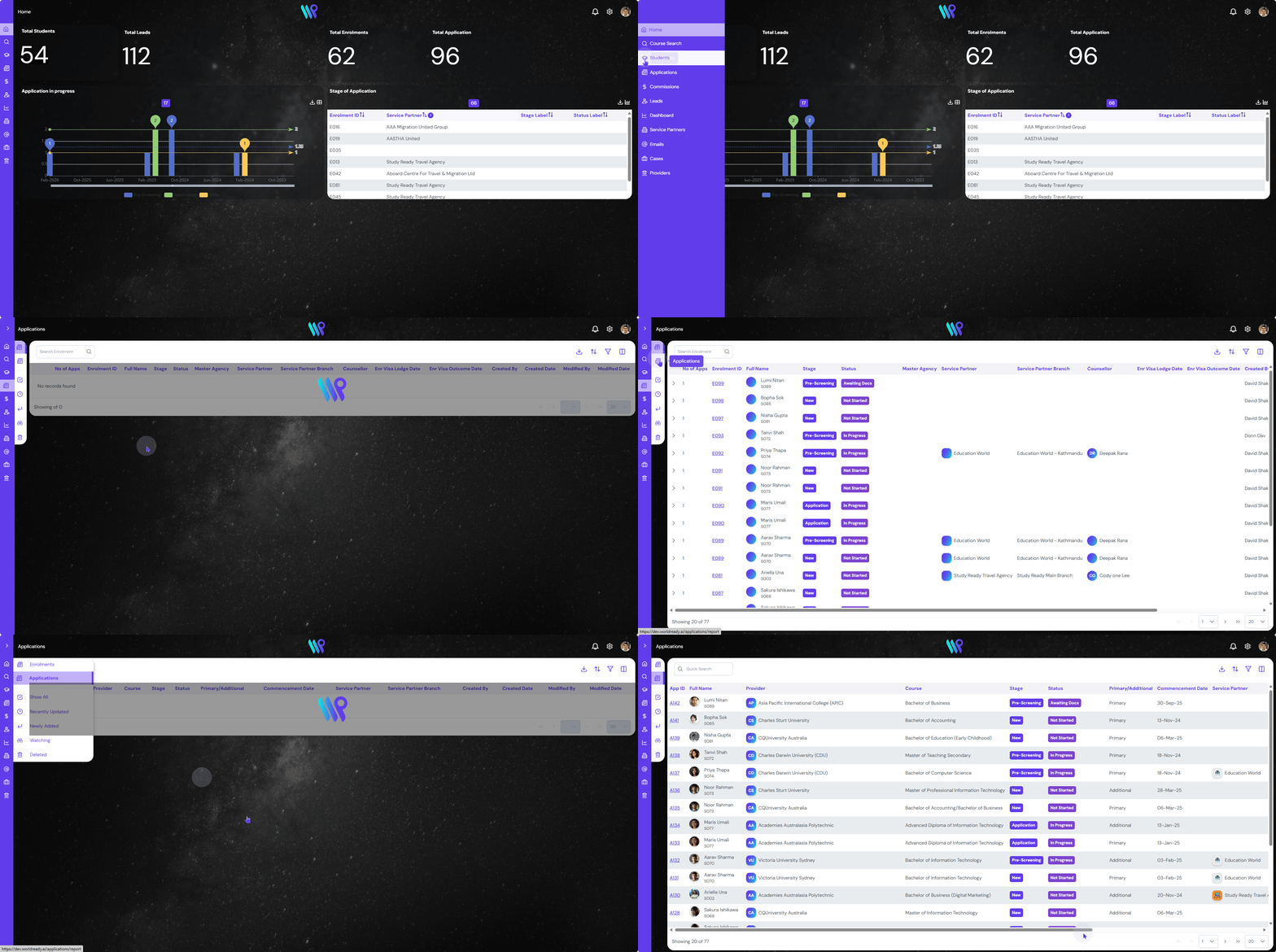
Click on the “Application” on the main menu bar. The default landing is on the Enrolment section. All the enrolment records will now be visible.
Sort the listing in various ways to get to your enrolment record faster.
Click on Recently Updated to see the most recent records at the top.
Click on Newly Added to have the most recent records at the top.
See all the application records you are watching by clicking here.
Clicking the Deleted button will list all the deleted application records with a strikethrough.
Show All button at the top will list all the active application records, except deleted ones.
Use the button to perform various functionality and navigate the application record faster.
Click on the Search bar to search for any application record with Enrolment ID, Application ID, Student Name, Email ID, etc.
The Export CSV button will help export all student records into a CSV file ready for download.
The next button on the Action Button helps to sort each column in ascending or descending order.
You can narrow down what you are looking for by using the filters too. Click this button to active the filters and filter out each columns.
Last view all the column or only the desired columns by clicking the Show/Hide Column button on the far right of the Action Button